If you’re running a Shopify store with more than 50 products, you’ve hit the wall: manual product descriptions don’t scale. You can’t spend 30 minutes per product when you have 200 SKUs. Yet mass-produced generic descriptions tank your search visibility and customer trust.
This guide walks you through a practical system for writing bulk product descriptions that maintain your brand voice, rank for keywords, and convert customers—without burning out your team.
The Scale Problem: Why Manual Stops Working
Here’s the math. If you spend 20 minutes per product description, writing 100 products takes 33 hours. If you have a full catalog and new products arrive weekly, you’re stuck doing this forever. Worse, quality drifts as fatigue sets in. One product reads like a sales pitch, another reads like a spec sheet, a third sounds like a different brand entirely.
Manual writing also doesn’t scale cross-functionally. If multiple team members write descriptions—your copywriter, your product manager, a contractor—you end up with inconsistent voice, tone, and formatting. Shopify doesn’t enforce consistency, so it falls to humans. Humans make mistakes.
At scale, “manual with editing” becomes your bottleneck. You need a system that enforces voice consistency, accepts bulk input, and minimizes rework. If you’re still writing one at a time, start with the fundamentals of writing descriptions that convert before scaling up.
Prioritize Your Catalog: Which Products to Write First
Not all products are created equal. Before you build a bulk workflow, decide which descriptions drive the most revenue and traffic.
Sort by revenue: Which products generate the most sales? Start there. A better description for your top 20 sellers pays for itself in conversion lift within days.
Sort by search volume: Use Shopify’s search analytics (or tools like Semrush) to identify high-volume keywords your store doesn’t rank for yet. Write or rewrite descriptions for the products that match those keywords.
Sort by age: Old descriptions often lack SEO optimization and feel dated. Products added more than 18 months ago are candidates for refresh.
Sort by conversion rate: If you have Shopify analytics, compare which product pages convert best. High-traffic, low-conversion products need rewritten descriptions.
Don’t try to write all 500 products at once. Pick your top 50 by revenue or search potential and nail those first. Your workflow improves with each batch.
Template-Based Approaches: Pros and Cons
Templates are the standard first move. You define a structure (“Product name → What it is → Who it’s for → Key benefits → How to use → Care instructions → Return policy link”) and fill in the blanks for each product.
Pros: Fast to set up, enforces consistency, delegates well to non-writers, keeps descriptions scannable and structured.
Cons: Templates sound robotic at scale. When 200 descriptions follow the same formula, customers notice. Templates also don’t adapt to product category. A skincare serum needs a different structure than a shirt.
When to use templates: Commodity products, high-volume catalogs (500+ SKUs), stores with tight brand guidelines, teams with limited writing skill.
When to skip templates: Premium brands, niche products, image-heavy categories, stores where description tone varies by product type.
If you do use templates, vary them. Have a template for clothing, one for skincare, one for home goods. We’ve put together niche-specific templates that give you a starting point for eight common Shopify categories. This keeps descriptions from sounding like a factory line.
CSV and Spreadsheet Workflows
Most bulk workflows start in a spreadsheet. You export your product catalog from Shopify, add a description column, fill it in, and re-import.
Export from Shopify: Go to Products > Export. Choose the “CSV for upload” format. This gives you a template that re-imports cleanly (same column order, same data types).
Organize your CSV: Keep columns minimal: Product name, SKU, Category, Current description (for reference), New description. If you’re using a template, add a “Template type” column so you know which products get which structure.
Divide and delegate: Break the spreadsheet by category or brand. Assign a writer to each section. Add a “Status” column to track who’s done what. Use spreadsheet comments for feedback.
Quality check before import: Look for common mistakes: truncated text (Shopify has character limits), missing line breaks, hardcoded prices (they change), formatting loss (Excel drops special characters). Spot-check 10 random entries before re-importing.
Re-import to Shopify: Go to Products > Upload products. Select your CSV. Review the preview for errors. Shopify will warn you about duplicates or missing required fields.
The CSV approach works well for 50–300 products. Beyond that, manual spreadsheet management gets messy. You’re better off with tooling.
AI Tools for Bulk Generation: What to Look For
If you’re writing hundreds of descriptions, AI tools are faster and more consistent than manual writing—but not all tools are created equal. For a detailed comparison of what’s available, see our roundup of the best AI description apps for Shopify.
Look for brand voice consistency: The best AI tools let you define your brand voice once and apply it across all descriptions. This might be through a questionnaire (preferred tone, target audience, key messages), preset templates, or material upload (existing brand guidelines, website copy, past descriptions). Tools that generate descriptions without brand context sound generic. If you haven’t documented your brand voice yet, defining it first makes every bulk run dramatically better.
Look for queue management: If you’re generating 100+ descriptions, you need batch/bulk processing, not a one-at-a-time dialog. The tool should accept a CSV, queue all jobs, and let you review outputs without manually triggering each one.
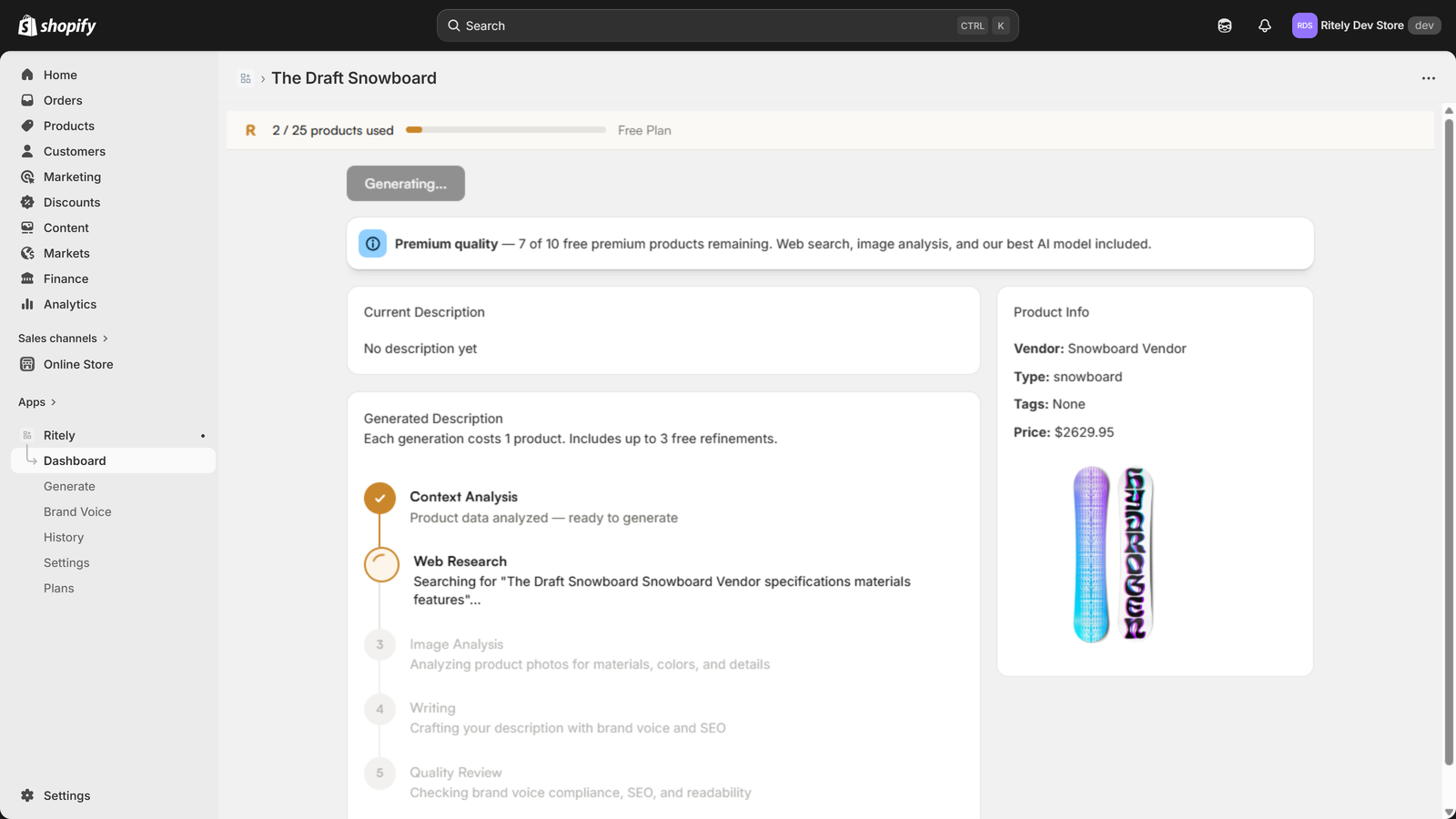
Look for progress tracking: When you upload 200 products, you need to see which ones are done, which are in progress, and which failed. Real-time progress UI saves you from wondering if the tool is actually working.
Look for refinement and revision: AI descriptions are rarely perfect on the first try. The tool should let you ask for rewrites (“Make it more conversational,” “Add SEO keywords,” “Emphasize the warranty”) without starting over.
Look for sampling and cost control: If you’re on a tight budget, the tool should let you generate descriptions for a subset of products first (your top 20) to make sure quality is good before committing to the full catalog.
Look for output flexibility: Some tools output plain text. Others add HTML formatting, bullets, or styled blocks. Check that the output format works with your Shopify workflow (imports cleanly, renders correctly).
Free tools (ChatGPT, basic Shopify Magic) work for 10–20 products. If you’re doing 100+, a specialized tool with bulk processing and brand voice control saves time and iterations. We’ve written a detailed breakdown of ChatGPT vs dedicated apps if you’re weighing that decision.
Quality Control at Scale
At 100+ descriptions, you can’t manually review every word. You need a sampling and testing strategy.
Statistical sampling: Review every 10th description or a random 10% of outputs. If defect rate in your sample is under 5%, assume the batch is acceptable. If it’s over 10%, stop and rework the template or AI settings.
Spot-check by category: Review 2–3 descriptions from each product category. Clothing descriptions should differ from digital products. If they don’t, your system (template or AI) isn’t differentiating properly.
SEO spot-check: Pick 5 descriptions at random. Check that they include the keyword you’re targeting (product name, category, material, use case). If half of them miss obvious keywords, your process isn’t optimized for search. Our guide to writing SEO-friendly descriptions without sounding robotic covers the keyword placement techniques that work at any scale.
A/B test before publishing: Pick 20 products with new descriptions. Keep the old descriptions on a variant or a test collection. Run the new versions for two weeks. Compare bounce rate, time on page, and conversion rate. If new descriptions outperform, roll out the rest with confidence.
Live monitoring: After launch, track which product pages have highest bounce rate or lowest conversion rate. Those descriptions might need rewriting. Use Shopify analytics (or Google Analytics 4) to flag underperformers.
Feedback loop: After 30 days, check search traffic and conversion metrics for the new descriptions. Document what worked and what didn’t. Use this data to refine your template, AI settings, or keyword strategy for the next batch.
Maintaining Consistency Across Contributors
If your team writes or edits descriptions, consistency is your biggest challenge. Brand voice is the connective thread — it’s what makes 500 descriptions sound like they came from the same store. For a deeper look at why brand voice matters for AI-generated content, we’ve covered that separately.
Document your voice: Create a one-page brand voice guide. Cover tone (formal vs. conversational), perspective (first person? second person?), key message patterns, and 3–5 example descriptions. Share it with everyone touching product descriptions.
Use a checklist: Before a description goes live, check: Does it mention the product category? Does it include a key benefit? Does it match the brand tone? Is it under the character limit? Does it include a call-to-action? A simple checklist catches 80% of inconsistencies.
Version your templates: If you use templates, version them. “Template v1.2 for clothing” is clearer than “Template for clothes.” When you refine based on performance, increment the version and communicate the change to your team.
Assign ownership: If multiple people write descriptions, assign one person as the voice owner and reviewer. They don’t need to rewrite everything, but they spot-check for tone and consistency.
Centralize examples: Maintain a folder of “approved descriptions” by category. When someone’s unsure about tone or structure, they reference existing descriptions. This is faster than reading a style guide.
The goal isn’t perfection. It’s consistency. Customers should feel like they’re reading the same brand, whether they’re viewing your bestseller or a new SKU.
Putting It Together: A Workflow
Here’s a realistic workflow for a store with 200 products:
Week 1: Identify your top 50 products by revenue. Export their data to a CSV. Define your brand voice in writing. Set up or select your bulk description tool.
Week 2: Generate or write descriptions for the first 10 products. Review quality. Refine your voice or tool settings based on what you learn.
Week 3–4: Generate the remaining 40 descriptions. Spot-check 5 random ones. Fix any systematic issues (missing keywords, wrong tone, formatting errors).
Week 5: Publish the first batch of 50. Monitor analytics for two weeks. Document what worked.
Week 7+: Repeat the process for products 51–100, then 101–150, etc. Each batch gets faster as your team learns the rhythm.
Don’t try to write 200 descriptions in one week. You’ll burn out and ship inconsistent work. Instead, batch the work in digestible chunks (50–75 products per cycle). This also lets you validate your approach before committing to the full catalog.
The Bottom Line
Writing product descriptions at scale requires more than just speed—it requires a system. Whether you’re using templates, spreadsheets, AI tools, or a combination, your success depends on three things: enforcing brand voice consistency, automating repetitive parts of the process, and building quality checks that don’t slow you down.
Start with your best-selling products. Test your approach on a small batch. Monitor results. Refine based on what you learn. Then scale. This approach turns bulk description writing from an impossible task into a repeatable process.
If you’re looking for a tool that handles brand voice, bulk processing, and real-time progress tracking out of the box, Ritely is designed exactly for this workflow.